My AWS bill on my desk: a serverless e-ink FinOps dashboard on a jailbroken Kindle
Every now and then I realize I have a soft spot for a very specific technology, and one of them is e-ink displays. A screen that keeps showing an image without using any power still sounds like magic to me. Unfortunately, I promptly discovered that e-ink displays are more expensive than I expected. Then I had an idea: everybody and their dog has a Kindle lying around. So I searched the second-hand market and got a Kindle Paperwhite 3 for 25€, which is crazy cheap if you look at the price per inch of display.
After jailbreaking it, I had to find a cool project for it. And of course, the first thing I tried was the one thing e-ink is bad at: a touch control panel for Home Assistant, hanging on the wall next to the door. It lasted a couple of days. A touch panel must stay awake to catch your finger and stay connected to show fresh states, and the Kindle was running out of battery faster than my phone. Quite an achievement for a device famous for lasting weeks.
Lesson learned: e-ink is great at showing an image that doesn't change often while the device sleeps. So the question became: what changes a few times a day, and should be looked at more often than it actually is?
My AWS bill, of course.
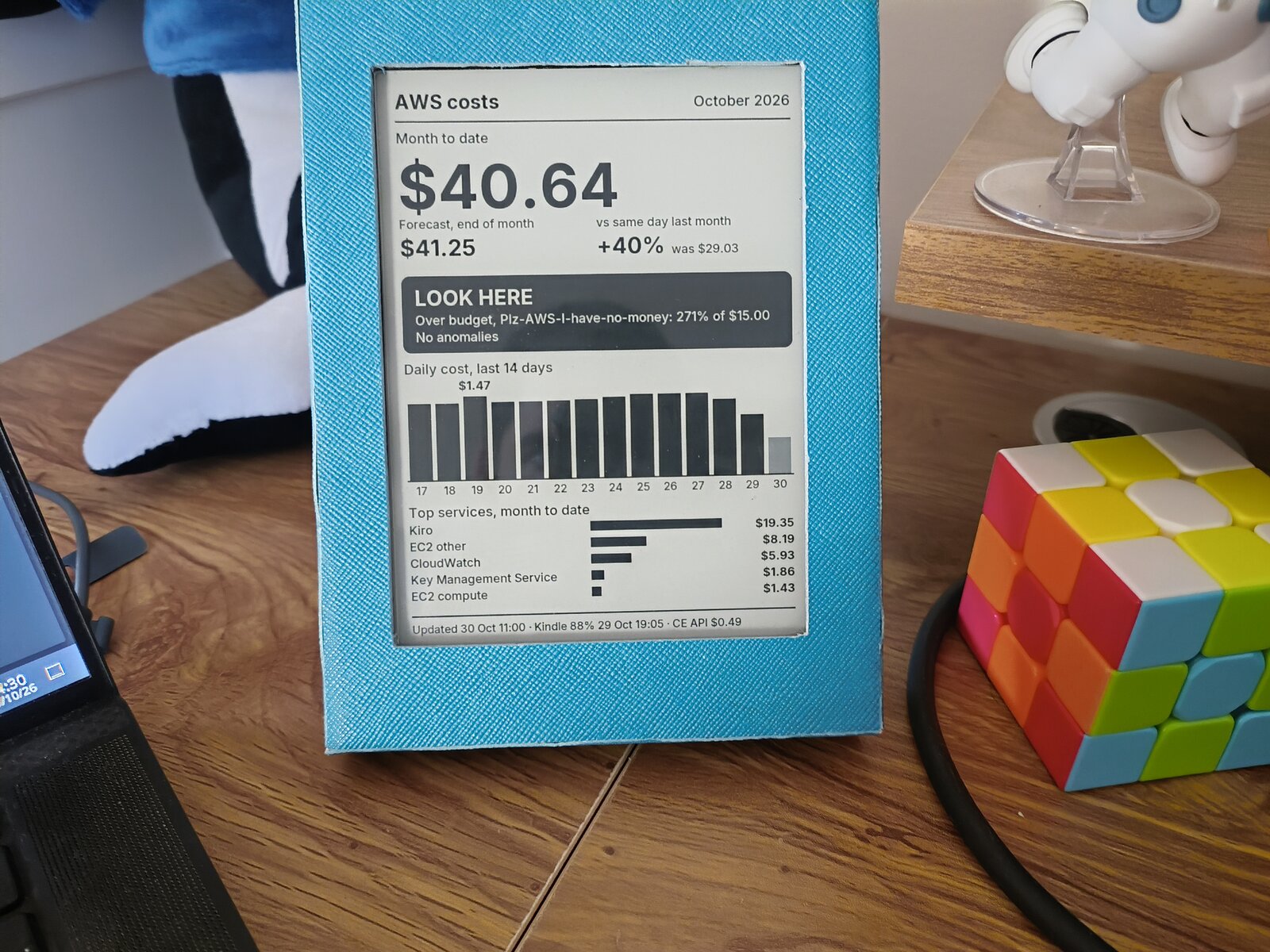
In this article I'll go through the serverless architecture behind it, what it takes to talk HTTPS with a 2015 e-reader, and why a cost dashboard can end up on its own bill.
Why a cost dashboard
In the FinOps anti-patterns article we talked about the Inform phase: collecting cost data and making it visible to the people who generate it. As Werner Vogels reminds us in The Frugal Architect, "unobserved systems lead to unknown costs". A screen sitting on my desk all day is hard to ignore.
It also turns out that cost data and e-ink are a good match:
- Slow data: Cost Explorer data is refreshed only a few times a day, so a display that updates every 4 hours isn't a limitation, it's just honest.
- Almost free to show: between refreshes the Kindle is suspended to RAM with the Wi-Fi off, and the panel keeps the image anyway.
- No distractions: no glow, no notifications. It's a picture frame that happens to know the forecast.
Here is the result, with made-up numbers (the photo above shows real data, though):
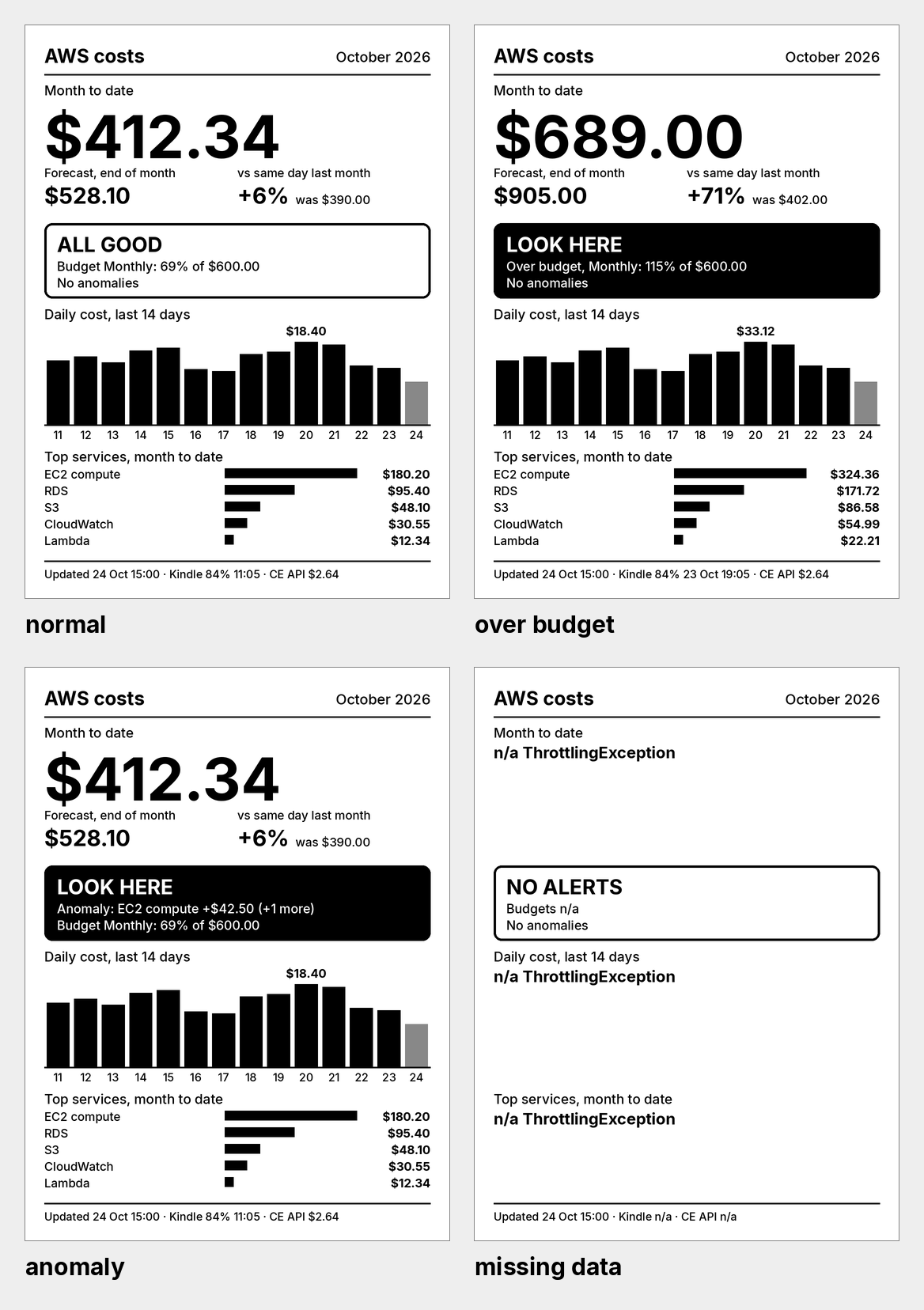
From top to bottom: month to date, the end-of-month forecast, the difference with the same day of last month, a status band (ALL GOOD / LOOK HERE) driven by AWS Budgets and Cost Anomaly Detection, the daily cost of the last 14 days and the top 5 services. The footer shows when the image was rendered, the Kindle's battery level and how much the dashboard itself costs. More on this last one later, since it's probably the most FinOps part of the whole project.
The architecture
The key decision is simple: the Kindle is a dumb display. It doesn't render anything, it doesn't hold AWS credentials and it doesn't even know what Cost Explorer is. It wakes up, downloads a PNG, draws it and goes back to sleep. Everything else happens in the cloud.
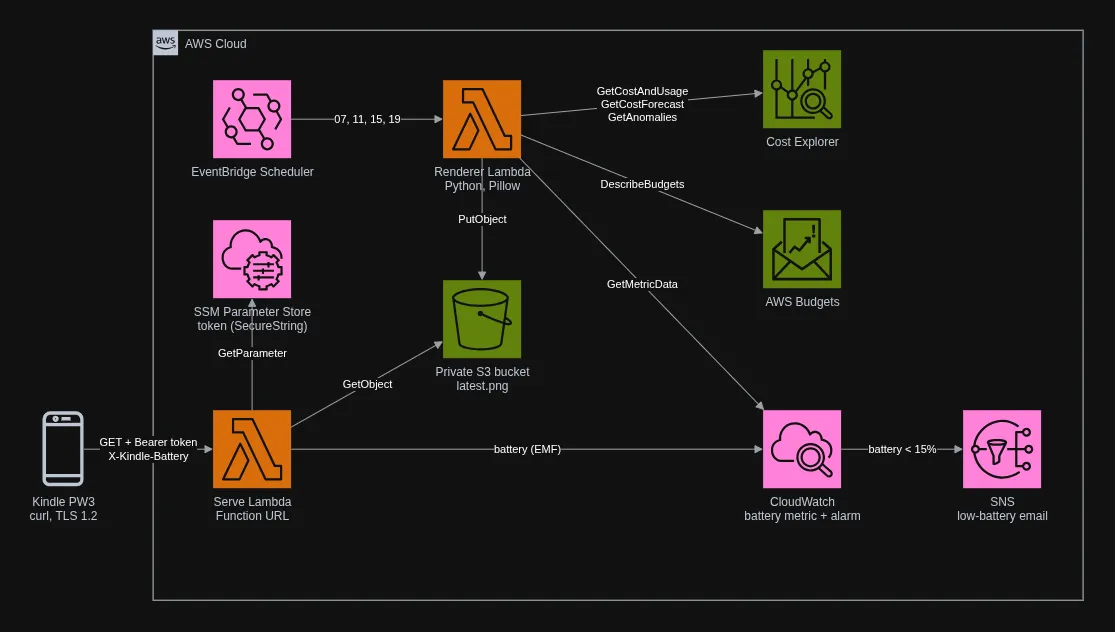
The flow is split in two halves:
- Render on a schedule: Amazon EventBridge Scheduler triggers the renderer AWS Lambda function at 07, 11, 15 and 19 (Europe/Rome). The function reads Cost Explorer, AWS Budgets and the battery metric, draws a 1072×1448 PNG with Pillow and writes it to a private Amazon S3 bucket.
- Serve from S3: the Kindle wakes up five minutes later and calls a second Lambda function through a Function URL. This one doesn't render anything: it checks a token, reads
latest.pngfrom the bucket and returns it. Battery-wise, the Wi-Fi radio is by far the most expensive component of the Kindle, so the request must be as short as possible.
There is also a small extra: every request carries an X-Kindle-Battery header with the battery level. The serve function turns it into an Amazon CloudWatch metric using the Embedded Metric Format (it's just a structured log line, no PutMetricData call needed), and a CloudWatch alarm sends me an email when the battery goes below 15%.
The infrastructure is written with the AWS CDK in TypeScript, while the Lambda functions are in Python.
The Kindle side: kindle-dash-pw3
For the device side, most of the work was already done by kindle-dash, developed by pascalw: it implements exactly the cycle I needed. Wake up through the RTC alarm, fetch the image, draw it, suspend. Unfortunately, it was written for the Kindle 4, and almost nothing worked on a PW3 with a 5.x firmware, so I ended up forking it into kindle-dash-pw3.
Here are the most interesting things I found along the way:
- No KUAL needed: every Kindle dashboard tutorial on the internet starts with "install KUAL", but the current KindleModding guides moved it to the legacy section. Packages are installed with KPM, and any
.shfile in thedocumentsfolder shows up in the library as a book that runs as root when tapped. So the dashboard is started by tapping a "book" called Start Dashboard. - SSH comes from KOReader: no USBNetwork either. KOReader ships a dropbear SSH server on port 2222, which is more than enough for development.
- A few hardware quirks: the wake-up alarm, the frontlight and the suspend logic all needed small fixes on the PW3 (the details are in the repository). What matters is that nothing starts at boot, so a hard reboot always gives the stock Kindle back.
And the battery? With 4 fetches per day it drops about 1% per day, which means 2 to 3 months per charge. Measuring it was easy, since the Kindle reports its battery level to CloudWatch at every fetch. The surprise is where that 1% goes: each fetch costs only about 0.03%, so almost all of it is the Kindle sleeping, and refreshing less often wouldn't help much anymore.
Talking to a 2015 HTTPS client
The Kindle's curl is version 7.61 with OpenSSL 1.0.2: TLS 1.2 at most, a CA bundle from 2019 and, of course, no way to sign requests with SigV4.
I tested the candidates with a Kindle-like client, and the simplest one won: a Lambda Function URL. It speaks TLS 1.2 and its certificate chain validates against the 2019 bundle, with nothing to configure. API Gateway and CloudFront would add a service to a flow that only returns a file (CloudFront stays as plan B if AWS ever drops TLS 1.2 on Function URLs), and S3 presigned URLs expire, while the Kindle reads a static URL from its configuration.
Since the Kindle can't sign requests, the Function URL has AuthType: NONE and the serve function checks a bearer token stored in an SSM Parameter Store SecureString (Secrets Manager would cost $0.40 a month for the same job). A leaked token only allows downloading a PNG and sending fake battery readings, and a reserved concurrency of 2 caps the cost of anyone hammering the endpoint.
In other words: I'm fine with someone seeing my bill if they really want to, I'm not fine with them making it bigger.
Drawing in 16 shades of grey
The PW3 panel is 1072×1448 at 300 ppi, but it only knows 16 grey levels. Designing for it is a good exercise in humility: black on white, big numbers, thick lines, because light grey text that looks elegant on a monitor simply disappears on e-ink. When something needs attention, the status band goes from a white box to a solid black one, visible from across the room.
Pillow does all the drawing, bar charts included: no headless Chromium, no HTML-to-image tricks. If a data source fails, its panel shows n/a and the rest is drawn anyway, and if the serve function doesn't answer at all the Kindle keeps the previous image. A display showing slightly old data is much better than an empty one.
The dashboard that costs money
And now the ironic part. The Cost Explorer API is not free: every request costs $0.01.
One cent sounds like nothing, until you do the math. If the renderer ran every 15 minutes, like the Kindle originally did, with 3 requests per render:
3 requests × 96 renders/day × 30 days × $0.01 = $86.40/month
A dashboard built to keep costs under control that becomes one of the costs. Not exactly frugal...
The solution didn't need any clever engineering, just a look at the data instead of the display. Cost Explorer data is refreshed a few times a day, so rendering more often only means paying again for the same numbers. The renderer now runs 4 times a day, and each run is squeezed into 3 requests:
GetCostAndUsage: DAILY granularity, grouped by service, from the 1st of last month to today. This single call feeds four panels: month to date, the same point of last month, the 14 daily bars and the top 5 services.GetCostForecast: the end-of-month forecast.GetAnomalies: the open anomalies from Cost Anomaly Detection.
Here is the monthly bill:
| Item | Per month |
|---|---|
| Cost Explorer API: 3 requests × 4 renders × 30 days = 360 × $0.01 | $3.60 |
| Lambda (renderer + serve, arm64) | < $0.01 |
| S3, SSM standard parameter, Scheduler, CloudWatch Logs | < $0.01 |
| Custom metric + alarm | $0 in the free tier, $0.40 outside it |
| Total | ≈ $3.60 |
Almost the whole bill is API calls, while the compute part is a rounding error. That's why the footer shows the "AWS Cost Explorer" line of the bill: the dashboard reports its own cost. If one day I get greedy and decide to render every hour, I'll see it on my desk the next morning.
Could it be cheaper? Of course. Two of the three requests can come from free sources: AWS Budgets already returns month to date and forecast through DescribeBudgets, and Cost Anomaly Detection can push its alerts to an SNS topic instead of being polled. The daily bars and the top services still need GetCostAndUsage, but history doesn't change during the day, so calling it once a day would bring the bill down to about $0.30 per month. Going all the way to zero is possible too, with Data Exports writing the detailed cost data to S3, but that's the right tool for an organization with dozens of dashboards, not for a Kindle on my desk. Saving $40 a year with more moving parts... let's say it's on the list.
Notes for CDK users
A few things that may save you an afternoon:
- Pillow for an arm64 Lambda without Docker:
uv pip install --python-platform aarch64-manylinux_2_28 --python-version 3.14 --only-binary :all:downloads the right wheels even from an x86 laptop.manylinux_2_28is fine, since Amazon Linux 2023 has glibc 2.34. Remember to bundletzdatatoo:zoneinfoneeds it, and Lambda doesn't guarantee the system timezone data. - TypeScript 7 and ts-jest don't get along: the CDK tests now run on Node's built-in type stripping and
node:test. No ts-node, no jest, one dependency less to babysit. - cdk-nag 3 plugs into CDK's native Validations: an unacknowledged finding makes
synthfail. Every suppression in the project has a reason written in the code, which is what you want in a public repository.
All the code is available on GitHub: kindle-aws-dashboard for the cloud side and kindle-dash-pw3 for the device side. The latter works with any server that answers a GET with a PNG, not only with AWS.
Conclusions
I bought a 25€ Kindle to play with e-ink, failed to turn it into a touch panel and ended up with a picture frame for my AWS bill. Honestly, I think it's the better project.
It's also a good reminder of something we repeat all the time in FinOps and apply less often than we should: visibility is the first step, but visibility has a cost too. Here the cost was hidden in an API that charges one cent per request, and the fix was to check how often the data actually changes before deciding how often to ask for it. The same reasoning applies to much bigger architectures, just with a few more zeros.